📜 Open Source License
SheetQuiz Editor includes the following open source libraries, please refer to the links for their respective license details.

- ExcelJS
License: MIT
Open Details

- FileSaver.js
License: MIT
Open Details

- Bootstrap 4.6.2
License: MIT
Open Details

- jQuery 3.7.1
License: MIT
Open Details

- Popper.js 1.16.0
License: MIT
Open Details

- MathJax
License: Apache License, Version 2.0
Open Details

- CodeMirror 5
License: MIT
Open Details
Formula Editor
$@\alpha@$ $@\beta@$ $@\gamma@$ $@\delta@$ $@\epsilon@$ $@\zeta@$ $@\eta@$ $@\theta@$ $@\iota@$ $@\kappa@$ $@\lambda@$ $@\mu@$ $@\nu@$ $@\xi@$ $@\omicron@$ $@\pi@$ $@\rho@$ $@\sigma@$ $@\tau@$ $@\upsilon@$ $@\phi@$ $@\chi@$ $@\psi@$ $@\omega@$
$@\Gamma@$ $@\Delta@$ $@\Theta@$ $@\Lambda@$ $@\Xi@$ $@\Pi@$ $@\Sigma@$ $@\Upsilon@$ $@\Phi@$ $@\Psi@$ $@\Omega@$
$@\frac{b}{a}@$ $@\sqrt{a}@$
$@x^{n}@$ $@x_{n}@$
$@\vec{A}@$ $@\bar{A}@$ $@\hat{i}@$
$@\angle@$ $@\circ@$
$@\emptyset@$ $@\cup@$ $@\cap@$ $@\in@$ $@\notin@$ $@\subset@$ $@\supset@$ $@\subseteq@$ $@\supseteq@$
$@\sum@$ $@\prod@$
$@\int@$ $@\lim_{x\to\infty}@$ $@\log_{a}{b}@$
$@\infty@$
$@\to@$ $@\leftarrow@$ $@\iff@$ $@\implies@$
$@\begin{matrix}a & b \\ c & d\end{matrix}@$ $@\begin{pmatrix}a & b \\ c & d\end{pmatrix}@$ $@\begin{bmatrix}a & b \\ c & d\end{bmatrix}@$ $@\begin{Bmatrix}a & b \\ c & d\end{Bmatrix}@$ \begin{array}{|l|l|} \hline \textbf{A} & \textbf{B} \\ \hline \rm{text1-1} & \rm{text1-2} \\ \hline \end{array}
$@\lt@$ $@\gt@$ $@\leq@$ $@\geq@$ = ≠
+ − × ÷
Gap $@\textrm{Serif}@$ $@\textit{Italic}@$ $@\textbf{Bold}@$ $@\underline{Underline}@$ $@\texttt{Code}@$ $@\mathbb{Text}@$ $@\mathfrak{Text}@$ $@\mathcal{Text}@$

ℹ️ To insert a formula between letters, enter it between $@ and @$, and to display it in block form, enter it between $$@ and @$$.
Insert image (Legacy)
Preview

ℹ️ The image code must be pasted at the end after entering all the questions.
Convert the image to text and then enter it after the question. Images cannot be inserted into the explanation.
💼 Software Information
SheetQuiz Editor For SheetQuiz 5.0
By Blackcats4567
Made in Korea

Unauthorized reproduction of this software is prohibited.

Terms Of Use | Privacy Policy
🔑 SheetQuiz Account
Terms Of Use | Privacy Policy
SheetQuiz Editor 4.9
📝 新規作成オプション


📝 AIと共に作成

ChatGPT

※ ChatGPTはOpenAIの商標です。OpenAIによって提供されており、SheetQuizはSheetQuiz用のGPTsを作成したものです。提携関係ではありません。


ℹ️ TIP
単語クイズにて、正解が複数ある場合はカンマで区切ってください。
フラッシュカードや用語定義を作成中の場合は無視してください。
採点時に括弧を無視するには、「主観式問題採点基準の緩和」をオンにしてください。
🔄 クイズの複製
複製する前に、このクイズが著作権で保護されているか確認してください。
非公開のクイズの場合、クイズの所有者のみが複製機能を使用できます。


☁️ クラウド編集モード
変更を保存・適用するには、必ず保存 (Ctrl+S) してください!
☁️ Upload to Explore

Before uploading, check your cloud limit. View Limits

📝 Create New Quiz


Before creating, check your cloud limit. View Limits
新しいクイズは非公開状態で作成され、リンクを知っている人なら誰でもアクセスできます。

Loading...


ご利用のブラウザのセキュリティポリシーにより、自動的にマイページへ移動できません。
下のリンクをクリックして、マイページに手動で移動してください。

マイページへ移動
❌ エディターを終了

本当に SheetQuiz エディターを終了しますか?保存されていない変更は削除されます。

🏠 SheetQuiz メインに戻る キャンセル
❌ エラー

クイズファイルを読み込めませんでした。
アクセス権限が不足しているか、ファイルが破損しています。

ログイン 再試行
🏠 SheetQuiz メインに戻る
ヘルプ

Test type

SheetQuiz supports two types of test papers, and the differences are as shown in the table below.

シートから作成 自作問題モード
Create by entering the question and answer

Appropriate choice in most situations, such as vocabulary tests

フラッシュカード、クイズが自動的に生成
Create by entering all information about the question, including the question, answer, question type (such as multiple choice), and multiple choice options.

Suitable options for creating true/false quizzes, test papers with pictures, and test papers with different types of questions

Before creating, you must identify the characteristics of the learning materials you want to produce and select the most appropriate test type.

ヘルプ

記述式採点基準の緩和

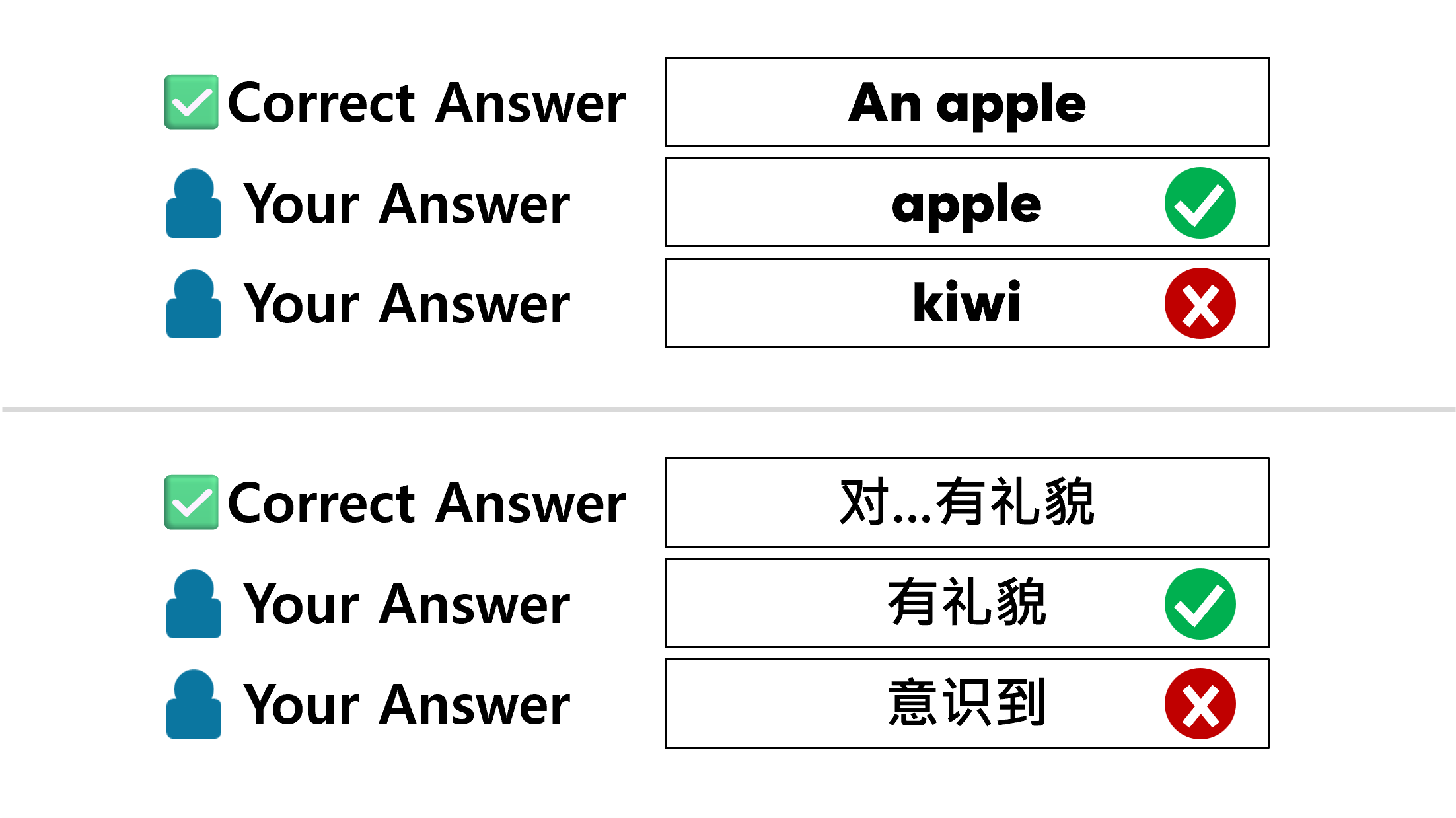
SheetQuiz provides a relaxed subjective grading criteria function for English, Korean, Chinese (Traditional), and Japanese. When enabled, subjective questions are graded without case distinction, even if the entered answer is slightly different, if the meaning is the same, it is treated as correct, and parentheses in the correct answer are ignored.

ヘルプ

採点後の正解・解説を非表示

This setting determines whether the [View Answers] and [View Explanation] buttons are displayed on the test results screen. If this setting is enabled, the buttons to view the answers and explanations will disappear after grading.

ヘルプ

試験のみ受験可能に設定

If you enable this setting, the button to learn with flashcards (Start with Cards) will disappear when you open a file.

ヘルプ

カードには1つ目の正解のみ表示

If there are too many correct answers to interfere with flashcard learning(ex: some Japanese tests), you can set the flashcard to display only one correct answer.

ヘルプ

カスタムテスト問題形式

ℹ️ TIP: 特定のタイプの問題を複数作成する必要がある場合は、[複製] ボタンをご利用ください!
  • 選択式(単一解答): 選択肢の中から1つだけを正解として選択できる問題形式を定義します。

  • 選択式(複数解答): 複数の選択肢を正解として選択できる問題形式を定義します。

  • 短答式: 1行の答えをユーザーから入力できる問題形式を定義します。複数の正解を定義できます。

    ⚠️ 「主観式問題採点基準の緩和」の設定がオンになっているかオフになっているかを確認してください。
    ℹ️ 短答式形式の問題の正解にコンマ(,)のみを入力すると、ユーザーがどんな答えを書いても正解として処理されます。
  • 記述式: 複数行の答えをユーザーから入力できる問題形式を定義します。正解は一つだけ定義でき、コンマ(,)も正解に含めることができます。

  • ○×クイズ: 選択肢がOまたはXである問題を定義します。

ヘルプ

Bookmarks

You can define a screen that allows the user to select the scope of the problem for this file.

  • Disable: The list is not loaded even if the file contains bookmark information.

  • Enable: Allows bookmarks to be loaded into the bookmarks list.

  • Enable & Auto pop-up: When the file is opened, a pop-up will open immediately to allow the user to select a bookmark, even if the user does not press the [Question Range] button. However, in this case, the pop-up will be executed as ✴️ Select Options.

Markdownヘルプ
文法 プレビュー
**太字** 太字
~~打ち消し線~~ 打ち消し線
__下線__ 下線
##ヘッダー1##

ヘッダー1

###ヘッダー2###

ヘッダー2

`コード` コード
```コードブロック```
コードブロック
$@E=mc^{2}@$ $@E=mc^{2}@$
$$@E=mc^{2}@$$ $$@E=mc^{2}@$$
LOGOEditor
  • ファイル
    ✏️ 新規作成 (Ctrl+Q) 📂 ファイルを開く (Ctrl+O) ☁️ クラウドに保存 📥 プロジェクトをダウンロード (Ctrl+D)
    ❌ エディタを閉じる
  •  
     
  • その他
    🔒 SheetQuizアカ​​ウントを管理する 🔍 アップロードしたクイズを編集する
    TEST SheetQuizでテスト
    📜 オープンソースライセンス 💼 ソフトウェア情報
  • ヘルプ
    🧑‍🎓 学生向けヘルプ 📅 「シートから作成」クイズの作成 🪄 「自作問題モード」クイズの作成 📊 結果の収集と共有 🤖 AIでクイズを作成する ⚙️ シートクイズ その他ヘルプ
    SheetQuiz ヘルプセンター
  • AI
    ✨ ChatGPTで新しいクイズを作成

    ※ ChatGPTはOpenAIの商標であり、SheetQuizはSheetQuiz用のGPTを作成しました。どんな資料をアップロードしても、SheetQuiz用のクイズファイルを丸ごと作成できます!


SheetQuiz Editor

クイズ作成


マイページから編集するクイズを選択


ヘルプ

シートクイズは初めてですか?
クイズ作成の始め方をご案内します。
表をコピー&ペーストしてすぐにクイズを作る方法を知りたいですか? アンケートにクイズを作るように作成したいですか? AIで高品質なクイズを作りたいですか?


  • 情報
    📜 オープンソースライセンス 💼 ソフトウェア情報